Recommendations for entering excise stamp attributes for the MINI T400ME fiscal cash register
1. Excise stamp attributes consist of 4 Latin letters (series) and 6 digits (number). These attributes are part of both barcodes, linear and 2-D, which are present on the excise stamp.
2. Entering excise stamp attributes is performed immediately after selling a good with an excise stamp in response to the input prompt on the cash register screen "Enter excise stamp".
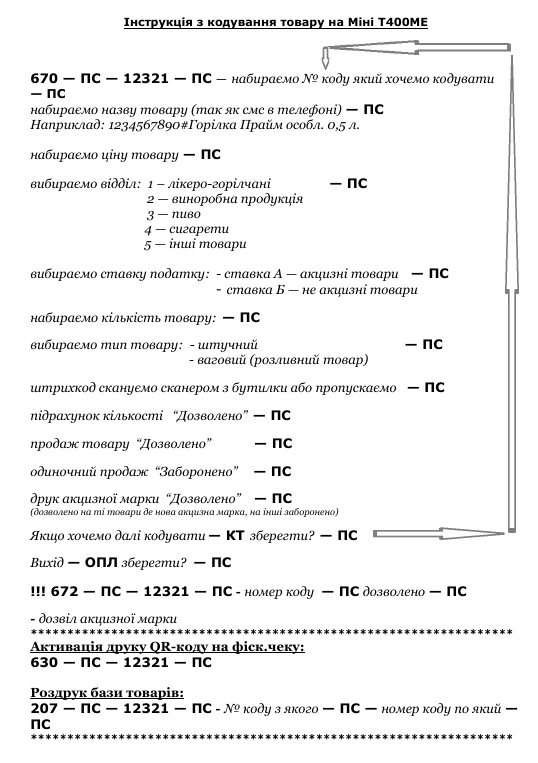
3. In order for the cash register to generate the prompt, the flag "Permission to print the attributes of the excise stamp of the good" must first be programmed for all goods with an excise stamp. The flag "Permission to print the attributes of the excise stamp of the good" can be programmed either from the cash register keyboard (command 672) or with the UNIPROGress program ("Goods data" with the "Excise" flag set).
4. Entering excise stamp attributes during a sale can be performed in several ways.
- a. From the cash register keyboard: first 4 letters (for this, the keyboard automatically switches to Latin letter input mode), then the keyboard should be switched to digit input (press the ЧЕК key for MINI-T 400ME or the F2 key for MINI-T 51.01, or the F key for MINI-T 61.01), then enter 6 digits and press the ПС key to confirm, or ОПЛ to cancel the input. If entering the excise stamp attributes was cancelled by mistake, press the АН key to undo the last operation and repeat the sale.
- b. From a barcode scanner, which must be connected to the COM port of the cash register. If the scanner can read both linear and 2-D barcodes, then any barcode can be read from the excise stamp. If the scanner can read only linear barcodes, then the linear barcode must be read from the excise stamp.
- c. If the sold quantity of excise goods is more than 1, then the corresponding number of excise stamp attributes should be entered.